How to Connect Your Fiverr Profile to LinkedIn (Step-by-Step)
Fiverr now lets Pro and Top Rated sellers link their account to LinkedIn and add a credibility signal to their profile. Here is exactly how to connect the two, from either side, with screenshots.
Fiverr just rolled out something a lot of freelancers have wanted for ages. You can now connect your Fiverr profile to LinkedIn, so the work you've proven on Fiverr shows up where most clients already check you out.
If you're a Pro or Top Rated seller, this is worth setting up today. It takes about a minute, and it puts a credibility signal right on your LinkedIn profile.
What the connection actually does
Once you link the two accounts, Fiverr appears in LinkedIn's Connected Accounts section. Your LinkedIn profile then shows a Fiverr credibility signal and a short capability statement: the services you offer on Fiverr, backed by your track record.
In plain terms, anyone who lands on your LinkedIn can see that your skills are proven, not just claimed. For clients searching LinkedIn for talent, that is a strong nudge in your favour.
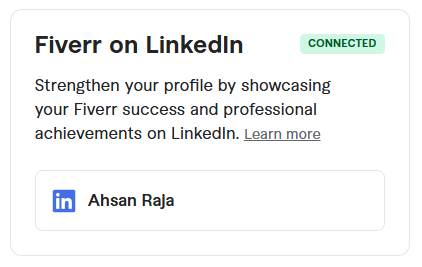
Who can connect
Right now the feature is open to Pro and Top Rated freelancers. If your account qualifies, the option will appear in the places below.
Two ways to connect
You can start from either platform. Most people will do it from Fiverr, but you can also add it from your LinkedIn profile. Here is both.
Method 1: Connect from your Fiverr profile
There are three places on your Fiverr seller account where you can kick this off:
- Dashboard message. A prompt in your freelancer dashboard invites you to connect your LinkedIn profile.
- Profile Strength checklist. A "Connect your LinkedIn" step shows up in your Profile Strength list and stays there until you connect. It flips to complete once you authorize.
- Seller profile (your own view). The LinkedIn card on your profile page lets you manage the connection, and disconnect later if you ever want to.
Once you click any of those, the steps are the same:
- Click Connect to LinkedIn.
- You'll be sent to LinkedIn. Log in if it asks you to.
- Click Allow so Fiverr can access your LinkedIn profile.
- You'll land back on Fiverr with a confirmation that you're connected.
That's it. The credibility signal shows up on your LinkedIn shortly after.
Method 2: Connect from your LinkedIn profile
Prefer to start on LinkedIn? You can add Fiverr as a connected account directly:
- On your LinkedIn profile, click Add section.
- Click Add connected account.
- Choose Fiverr from the list.
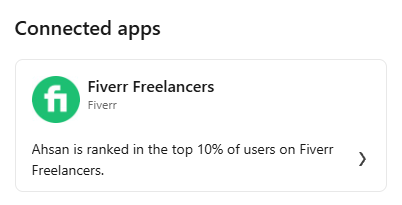
LinkedIn walks you through authorizing it, and once you're done, Fiverr sits in your Connected Accounts for everyone to see.
Why it's worth doing
Most of your future clients are already on LinkedIn. Letting them see proof of your Fiverr work without leaving the platform removes a step between "interested" and "let's talk". It costs you nothing and takes a minute.
If you run your freelancing like a business, treat your LinkedIn the way you'd treat a website. Every credibility signal you can add is one more reason for a client to trust you before the first message.
And when you're ready to take that further with a proper site of your own, that's exactly what we do.
Want a website without the upfront bill?
We design & build it free. You just cover £20/month for hosting.